Complete guide for linking bank accounts, withdrawing funds, and depositing via wire transfer.
Summary & Fee Schedule
| Service Type | Processing Timeframe | Applicable Fee |
|---|---|---|
| Domestic Wires | 1–2 business days | $30.00 USD |
| US Wires | 1–2 business days | $50.00 USD |
| International Wires | 1–2 business days | $75.00 USD |
1. First-Time Setup: Connecting Your Wire Bank Account
Before requesting an outgoing wire transfer, you must link your external wire bank account to your Clear Street account.
Setup Instructions
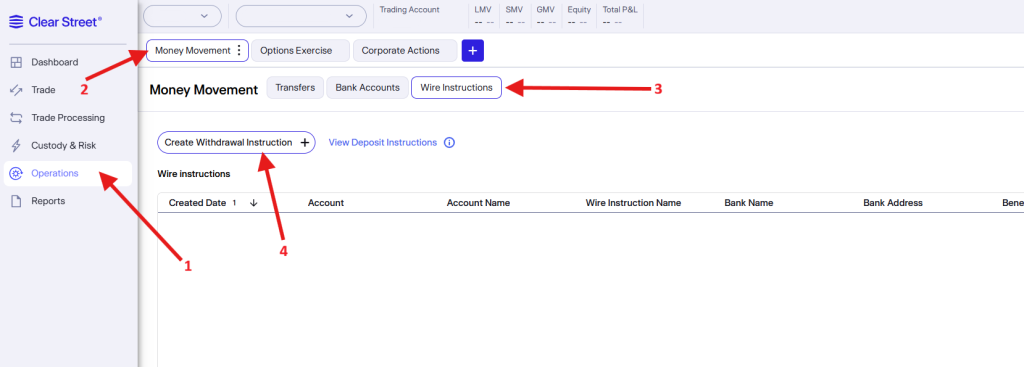
- Navigate to Operations from the top left-menu and then click on Money Movement.
- Then click on the “Wire Instructions” tab.
- Then click on the “Create Withdrawal Instructions” button.
- Select your Clear Street account.
- Enter your financial institution’s banking details:
- Bank Name and Full Address.
- Routing / ABA Number (for domestic/US wires) or SWIFT / BIC Code (for international wires).
- Account Number / IBAN.
- Beneficiary Name (must match the primary name on your Clear Street account).
- Review the details carefully to ensure accuracy and click Submit.
- Once submitted, our operations team will process your request typically completed within 1 business day.
2. Submitting a Wire Transfer Request (Withdraw Funds)
Once your external wire account is connected and verified, you can submit a withdrawal request at any time.
Withdrawal Instructions
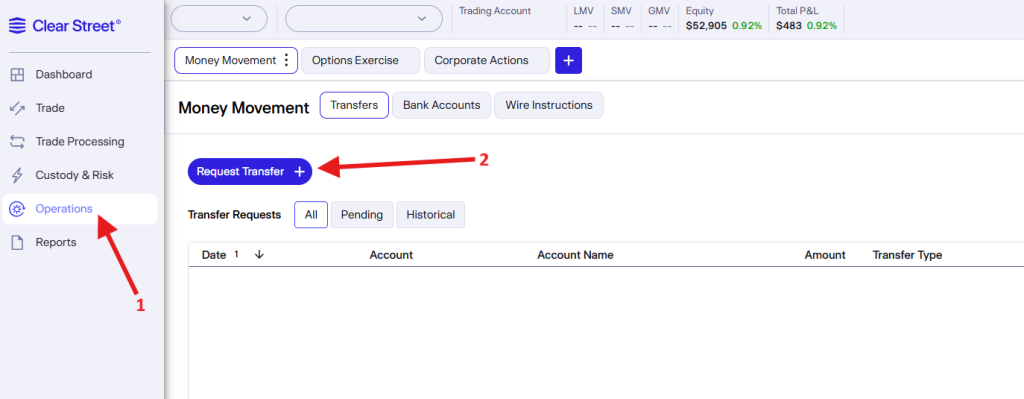
- Navigate to Operations from the top-left menu and then click on Money Movement.
- Then click on the “Transfers” tab.
- Then click on the “Request Transfer” button, then select Wire Withdrawal from the dropdown menu.
- Review the transfer details and associated fee:
- Domestic Wires: $30.00 USD
- US Wires: $50.00 USD
- International Wires: $75.00 USD
- Confirm the request and complete any required multi-factor authentication steps.
Note: Wire withdrawal requests submitted before 3pm EST cut-off time are processed on the same day. Standard delivery takes 1–2 business days depending on receiving bank processing times.
Depositing Funds via Wire Transfer
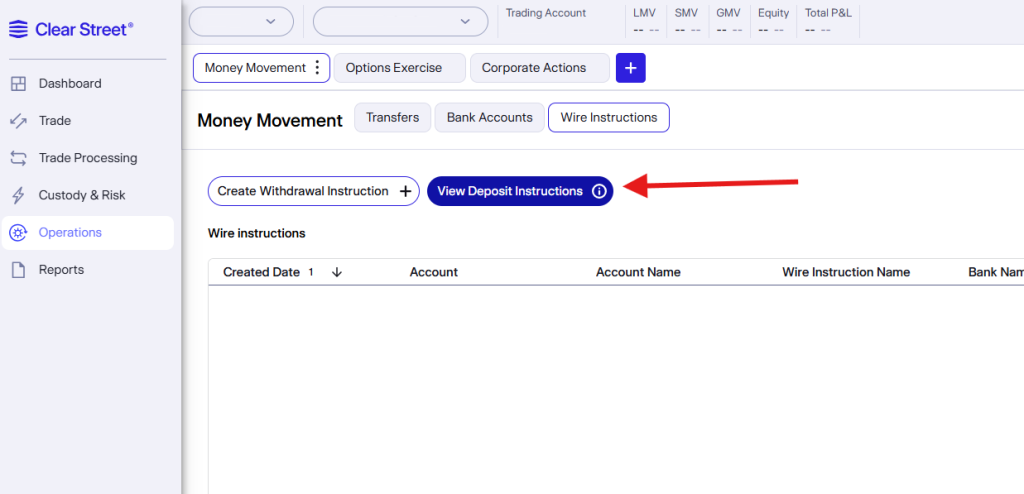
To deposit funds into your Clear Street account via wire, please use the View Deposit Instructions button at the top of the Wire Instructions page to access our official routing and account instructions for CAD or USD deposits.
Use those provided banking details to initiate a transfer directly from your bank account.
Important Note: Depending on your financial institution, you may need to visit a local bank branch in person to authorize an outgoing wire to our banking instructions.